#OMG.. one man's fun is another's hell..?
What Is PDF File
 Before that, PDF file is Portable Document Format - one of the best universal (not really but can say so) format that support mostly any device, pc & gadgets. Yes it's created by Adobe System, but was released as open source. A PDF file usually can be read using Adobe Reader app, which is free to download, also can be read using any 'PDF Reader' apps. So PDF is a file format, not software.
It can be created or 'Save As' → PDF using any supported softwares. When a PDF file being created using software like Ms.Word, Excel, Powerpoint, Adobe Illustrator, Photoshop, InDesign, etc, using command 'Save as PDF documents', it will save the documents 100% just like it was created using different software.
PDF vs Word
 Unlike Ms.Word documents, when we create a Word document, save it in .doc or .docx format (Word format), the .doc file will not guarantee be as similar as the original source when it being open at other pc, because the Word format is depends on the local computer that read the file. If some specific fonts were used in the Word document at origin pc, the other pc which receive to open the file might not know the specific fonts used, as the Word document did not save the fonts together, instead it replace with standard fonts in the (other) local pc. So the receiver did not know what's being changed. Also the documents formatting, margins, tables, graft, might seems different or more worst missing some elements in the other pc without the receiver realised it.
So here comes the PDF format to solve this problems. In fact PDF format can save all elements, fonts, table, graft, graphics (raster & vector), formatting, margin, etc. all contents are 100% just like the documents was created (using Word itself, or any other software). Not just saving in PDF format keep the file small in megabytes (or perhaps kilobytes), also no issue on viewing it on other pc or platforms.
Protected PDF File
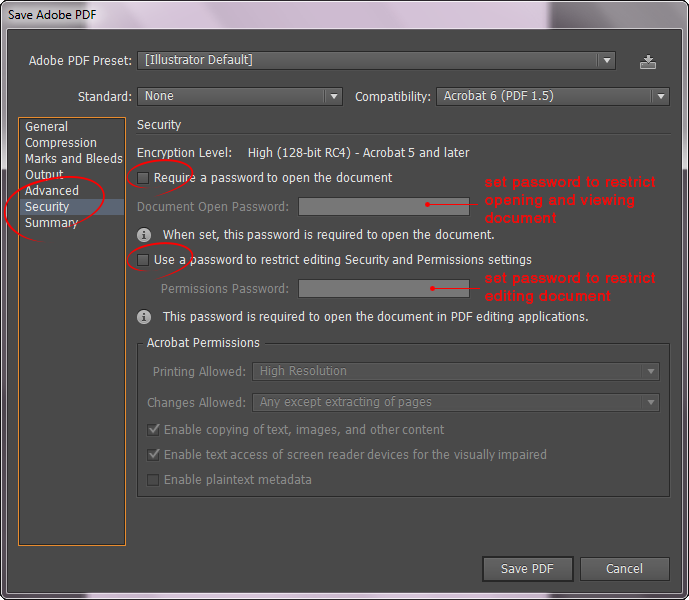
One of the very good points in using or saving as PDF format, we can password protect the PDF file, where other format don't have this feature. How to lock a PDF file..? Basically there are 2 types of setting PDF security password:- Password Protect to Open the document
block users from view and read the PDF document
- Password Protect to Print and Edit the document
disable users from print and disable users from trying to edit the PDF documents using other software (i.e Word, Illustrator, Photoshop, etc.)
How to Password Protect your PDF document..?
In Adobe Illustrator:Designers are familiar with this app..
File > Save As > Adobe PDF > Save > follow image ↓
In Adobe Photoshop:
A designers, artist, photographers must have app to work with..
File > Save As > Photoshop PDF > Save > follow image ↓

In Microsoft Office Apps:
(In Microsof Office, you should have Adobe Acrobat Installed)
Follow this guide.
Using Adobe Acrobat Pro
Or we can also use Adobe Acrobat Pro to set those password and better handling the security features. Using Acrobat Pro, there are several types of securities we can set.
So when we password protect our documents, eBooks, this mean the PDF files are secure from unauthorised download / viewing..? Well.. not really..
Unlocked Protected PDF File
This is what we gonna share about..!! How to Unlock Password Protected PDF File..? Can it be unlocked..? Well yes, perhaps some of you already knew, and some may still keep thinking no way a protected PDF file can be unlocked..!!
Yes, even I personally think no it cannot previously.. lol. As a PDF user, probably you ever use some free online services for PDF, like 'convert file to PDF', or 'convert PDF to other file', or 'merge PDF files' and etc. via online. Like it or not there are (many) services that offer free Unlock PDF file.. indeed.
Good News Is Bad News
For PDF users, I mean users who always like to download PDF books, be it tutorials, or anything, when the PDF was password protect we end up with frustration. Of course, we need to buy to read the PDF eBooks, cracking the password is illegal, I must say this ☺. But for some of you who never knew that unlocking password protected PDF is available, might surprise to see there are many sites offer Unlock PDF files for free.No I'm not promoting any websites or any services.. I'm just sharing knowledge for our own use. Remember one thing, Unlock password protect PDF file of your own forgotten password for the PDF files that belongs to you.. that sounds better ☺
At the same time we knew this good news, the ability to unlock protected PDF files, it's a bad news to PDF creator, eBook writer, publisher, any one who deal with secured PDF files (me too). Then how to avoid users download and illegally unlocked (or cracked) the PDF file's password..? Good thing is we, as (one of) PDF creator, writer, we can still password protect our PDF documents securely, cracked-proof.
Change The Key Lock
For serious PDF creator that wanna password protect your PDF documents, you need to change the password you use. Make a high secure password.Using Adobe Acrobat Pro
 there are 2 ways to password protect your PDF file:
- Password Security - set the password to protect from Open, Editing & Printing.
- Certificate Security - set 'digital ID' which is more secure, using 128 bit & 256 bit AES
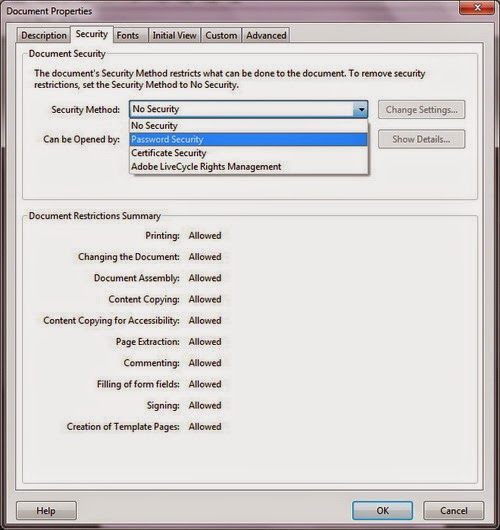
As a normal user, I just choose Password Security as my protected PDF documents. I don't wanna use the Certificate Security, because it seems more complex and if anything happen to my pc, it might hard for me to get the protected files when the 'digital ID' was damage, (I guess). So I remain with password security, easier for me to create the 'formula to remember' ☺
So when you use Password Security..
Choose whether you wanna protect the document from being Open (read) or just choose Restrict Editing & Printing only ↓ (setting shown below just for example)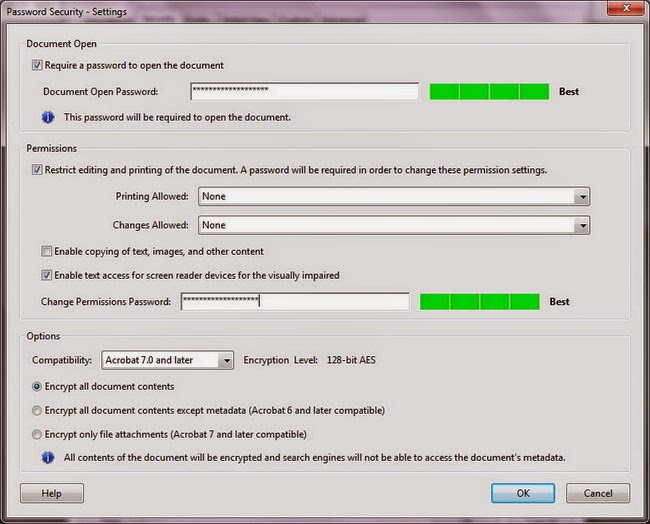
The key to get high secure password is to use all characters combinations:
small letters + CAPITAL Letters + Numbers 123 + Symbols ={&-
Notice when you set the password in the password box, there is password's strength bar indicator on the right with Weak, Medium & Best. Make sure your password combination is set to Best (green color bar). Then click OK, and Save your PDF file.
Test it
You can try to Open it, if you have set the 'password to Open'.You also can try to Print it if you have set 'Printing Allowed: None'.
You can also try to open it with other software (i.e. Photoshop, Word) to test it if you have set 'Changes Allowed: None'.
This way, any tools might take million of years to unlock or crack the password. I have test my personal password protected PDF document with high secure password combination, and these are among the results using..
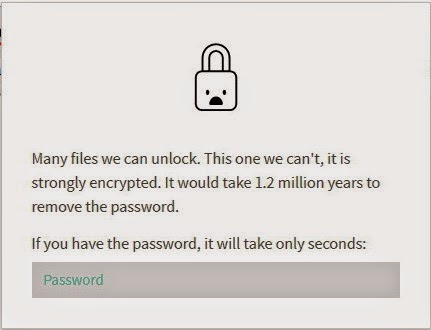
"It would take 1.2 million years to remove the password" - small PDF #failed
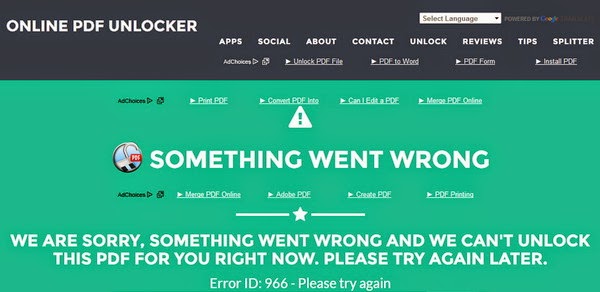
Several times I tried to unlock using ↑ PDF Unlocker.. also #failed
And I've been using some more free online PDF unlocker, also end up with error, which normally these tools easy and successful to unlock normal password protect PDF file.
So the conclusion is you can unlock password protect PDF file (if you forgot the file's password). And if you serious in protecting your PDF file, make it hard to unauthorised user or hacker to crack your document's password. There is possibility but make it million of years just to unlock a file..
Last but not least, don't forget your password, nobody will live million of years ☺